Tampilkan postingan dengan label nikon. Tampilkan semua postingan

Selasa, 05 April 2011

NIKON D5100

Horizontal swing out, vari-angle monitor for better viewing, full-HD movie recording function and simple, orthodox operation for capturing the intended photos

TOKYO – Nikon Corporation is pleased to announce the release of the Nikon D5100, a Nikon DX-format digital-SLR camera equipped with a vari-angle monitor, and a CMOS image sensor and the EXPEED 2 image-processing engine that enable high-resolution rendering and rich expression of tones.
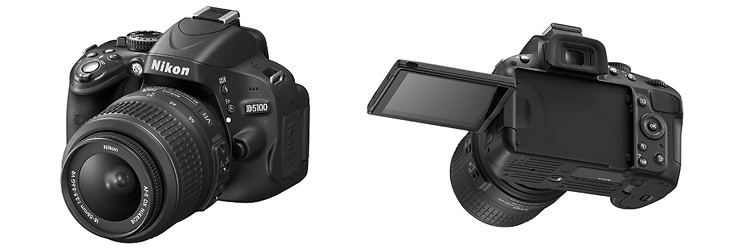

D5100 with AF-S DX NIKKOR 18-55mm f/3.5-5.6G VR

The D5100 is a member of the popular D5000 series. The D5000 was the first Nikon digital-SLR camera equipped with the vari-angle monitor that allows users to enjoy flexible shooting from a wide variety of angles. The vari-angle monitor adopted for the D5100 has been enlarged to three inches, and utilizes a side hinge that enables flexible use from more angles with hand-held shooting and when the camera is mounted on a tripod. The camera is also equipped with the D-Movie function that supports recording of full-HD (1920 X 1080p, 30p) movies, as well as a Special Effects mode with which a variety of special effects can be applied to still images and movies. The D5100 was designed to respond to the needs of a broad range of users, from those using a digital-SLR camera for the first time, to those looking for a camera that allows them to express their individual sense of creativity through still images and movies.

D5100 Primary Features

  1. A high-resolution Nikon DX-format CMOS image sensor with an effective pixel count of 16.2-million pixels, an image-processing engine that provides superior image quality and rich expression of tones, and the new High Dynamic Range (HDR) function 
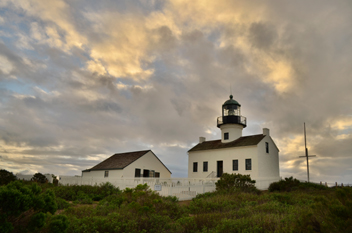
     
    HDR sample image

    The D5100 is equipped with the same DX-format CMOS image sensor and EXPEED 2 image-processing engine as the high-end D7000 digital-SLR camera. These features enable capture of high-resolution images with excellent expression of tones. With standard sensitivity settings of ISO 100–6400 and additional increases up to Hi 2 (ISO 25600 equivalent), the camera offers improved capability with shooting under dim lighting, such as in the evening or indoors, and also produces better results with capture of rapidly moving subjects. The High Dynamic Range (HDR) function captures two shots of varying exposure each time the shutter-release button is pressed, and then combines the two shots into a single image with a broad dynamic range. Resulting images beautifully recreate the scene as seen with the naked eye, even with shooting of backlit scenes, with little or no loss of detail in shadows or highlights.

  2. 3-in., approximately 921k-dot vari-angle monitor with wide viewing angle and increased visibility
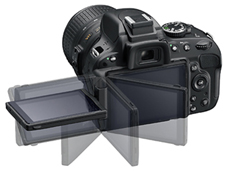
    Vari-angle monitor movement diagram

    Visibility has been increased with the large 3-inch, approximately 921k-dot high-resolution vari-angle monitor adopted for the D5100. In addition, the range of colors that can be reproduced by the monitor is equivalent to that of the sRGB gamut. Adoption of a side hinge for the vari-angle monitor prevents the monitor from hitting the tripod when it is opened while the camera is mounted on a tripod. The vari-angle monitor opens from 0 to 180° to the side, and can be rotated up to 90° clockwise and up to 180° counter-clockwise when it is open. This enables shooting from a wide variety of angles, from low to high, making even self portraits possible.

  3. D-Movie for recording and editing of Full-HD movies
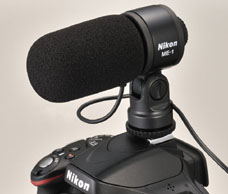
    The D5100 is equipped with the D-Movie function that enables recording of high-definition movies (1920 X 1080p, 30p) exhibiting superior video quality. Autofocusing during movie recording is possible using contrast-detect AF. When the focus mode is set to full-time-servo AF (AF-F) and the AF-area mode to subject-tracking AF, the camera automatically maintains focus on a subject moving throughout the frame. The D5100 also offers in-camera movie editing functions that allow users to save a single frame as a still JPEG image or delete unnecessary portions from the beginning and/or end of movie files. What's more, the D5100 is equipped with built-in support for stereo audio recording via the Stereo Microphone ME-1 (available separately), and the mode dial and live view switch have been positioned on the same spindle in consideration of operational ease.
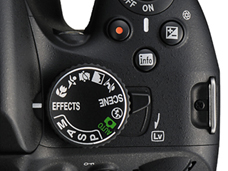
    Mode dial, live view switch image(s)

    Stereo Microphone ME-1 image

    • The optional Stereo Microphone ME-1 can be used to record sound in stereo while also preventing noise caused by lens vibration being recorded during autofocus.

  4. The first Nikon digital-SLR camera to offer Special Effects mode
    The D5100 offers special effects that can be selected and applied with both shooting of still images and recording of movies. Special effects are displayed with the view through the lens in the monitor before shooting or recording begins, allowing users to confirm the desired results in real time. Users can easily enjoy adding special effects to movies. This mode was adopted to respond to the creative intent of users searching for a way to express their own unique style and creativity.

    The Special Effects mode built into the D5100 offers seven special effects, including Selective Color and Color Sketch.


    Favorite Special Effects Selective color
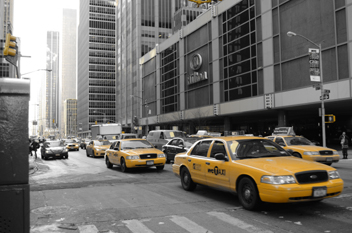
     
    Selective color sample image
    All colors other than those selected by the user are recorded in black and white. Up to three colors can be selected at a time.
    Color sketch
    The camera detects and colors outlines for a color sketch effect. Users can use the monitor display to adjust the vividness of colors and the thickness of outlines.
     
    Miniature effect
    Distant subjects appear as miniatures for a diorama effect. Users can choose the orientation (vertical/horizontal) and width (narrow/normal/wide) of the area that will be in focus.
    Night vision
    When this option is selected, extremely high ISO sensitivities are used (up to ISO 102400 equivalent). This enables shooting under conditions of darkness while verifying the subject and composition in the monitor.
    • *RAW recording is not possible. Still images can only be recorded in JPEG (black-and-white) format. Only contrast-detect AF can be used.

Additional Features and Functions

  • High-speed continuous shooting at up to approximately 4 fps*,and a very precise and durable shutter unit that has passed testing for 100,000 cycles
  • Equipped with Quiet shutter-release mode for shooting in situations in which quieter shutter operation is desired
    Infrared receivers for remote control operation on the front and back of the camera enable wireless control over the shutter from both in front of and behind the camera (optional ML-L3 wireless remote control supported).
  • Equipped with 16 scene modes that enable the simple capture of beautiful photos of the desired scene with automatic optimization of camera settings
  • Built-in HDMI-CEC compatibility enables control over playback of still images and movies using the television's remote control when the camera is connected to a high-definition TV via the HDMI connector.
  • *Manual focus, M or S mode, shutter speed 1/250 s or faster, and other settings at default values

The D5100 digital-SLR camera primary specifications

Type Single-lens reflex digital camera
Lens mount Nikon F mount (with AF contacts)
Effective pixels 16.2 million
Image sensor 23.6 X 15.6 mm CMOS sensor
mage size (pixels)
  • 4,928 X 3,264 (L)
  • 3,696 X 2,448 (M)
  • 2,464 X 1,632 (S)
File format 1) NEF(RAW), 2)JPEG, 3)NEF(RAW)+JPEG
Media SD (Secure Digital) memory cards *1
SDHC, and SDXC memory cards
Frame advance rate Up to 4 fps *2
ISO sensitivity ISO 100 – 6400 in steps of 1/3 EV. Can also be set to approx. 0.3, 0.7, 1, or 2 EV (ISO 25600 equivalent) above ISO 6400; auto ISO sensitivity control available
Movie Frame size (pixels) and frame rate :
  • 1,920 X 1,080, 30 p/25 p/24 p, high/normal
  • 1,280 X 720, 30 p/25 p/24 p, high/normal
  • 640 X 424, 30 p/25 p, high/normal
A frame rate of 30 p (actual frame rate 29.97 fps) is available when NTSC is selected for video mode. 25 p is available when PAL is selected for video mode. Actual frame rate when 24 p is selected is 23.976 fps.
File format/Video compression:
MOV, H.264/MPEG-4 Advanced Video Coding
Audio recording device:
Built-in monaural or external stereo microphone; sensitivity adjustable
Monitor 3-in., approx. 921k-dot (VGA), vari-angle low-temperature polysilicon TFT LCD with 170° viewing angle, approx. 100% frame coverage, and brightness adjustment
Power source Battery : One rechargeable Li-ion EN-EL14 battery
AC adapter : EH-5b AC adapter; requires EP-5A power connector (available separately)
Dimensions (approx.)
(W×H × D)
128 X 97 X 79 mm
Weight (approx.) 510 g without battery, memory card, or body cap
560 g with battery and memory card but without body cap
Major supplied accessories EN-EL14 rechargeable Li-ion battery, MH-24 battery charger, AN-DC3 strap, EG-CP14 audio/video cable, UC-E6 USB cable, DK-5 eyepiece cap, BS-1 accessory shoe cover, DK-20 rubber eyecup, BF-1B body cap, ViewNX 2 CD-ROM
  • *1Not applied to Multi Media Card
  • *2Manual focus, mode M or S, shutter speed 1/250 s or faster, and other settings at default values
  • Unless otherwise stated, all figures are for a camera with a fully-charged battery operating at an ambient temperature of 20° C (68° F).
  • Specifications, design, product name and supplied accessories may differ by country or area. Specifications and equipment are subject to change without any notice or obligation on the part of the manufacturer.

Senin, 28 Maret 2011

NIKON D3S

D3S


Nikon FX-format digital SLR flagship for fast response and high light sensitivity
  • ISO performance: ISO 12800 as standard, expandable to ISO equivalent of 102400 (Hi 3)
  • Nikon FX-format CMOS image sensor with 12.1 effective megapixels
  • Improved D-Movie function including High-Sensitivity Movie mode and flicker reduction function
  • Nikon's Integrated Dust Reduction System including Image Sensor Cleaning function
  • Incorporates Nikon's original EXPEED digital image processing
  • Active D-Lighting with bracketing for up to 5 frames
  • Picture Control: Standard, Vivid, Neutral and Monochrome (Landscape and Portrait can be downloaded from Nikon website)
  • Quick response with approx. 0.12 seconds start-up time and approx. 0.04 seconds shutter-release time lag
  • 9-frames-per-second shooting rate in FX format, 11 fps in DX crop (CIPA Guidelines)
  • Nikon's original Scene Recognition System, utilizing 1,005-pixel RGB sensor, for more accurate autofocus, auto exposure, i-TTL flash control and auto white balance
  • Multi-CAM 3500FX AF sensor module featuring 51 AF points
  • Viewfinder with approx. 100% frame coverage and approx. 0.7x magnification in FX format
  • Durable shutter unit proven by 300,000 cycles of testing on fully assembled camera
  • Intelligent power management that lets you shoot up to approx. 4,200 frames per charge (based on CIPA Standards)
  • Easy-to-access Live View modes with dedicated button
  • Quiet Shutter-release mode for nonintrusive shooting
  • High-definition (approx. 921k-dot), 170° viewing angle, 3-in. VGA LCD monitor with tempered glass

Minggu, 27 Maret 2011

 Nikon D7000

D7000

Inspired performance in a size that keeps you shooting


          Baru dikembangkan Nikon DX-format CMOS sensor [BARU]
Approx. 16.2 effective megapixels. Baru dikembangkan Nikon DX-format CMOS sensor menyadari detil gambar yang menakjubkan dan berbagai macam sensitivitas ISO 100-6400.

          
          Paduan Magnesium digunakan untuk tubuh / tahan cuaca dan Superior anti-debu kemampuan. Ringan dan tahan lama paduan magnesium yang digunakan untuk atas dan belakang penutup. bagian Tersambung dan berbagai titik aman disegel, mencapai kinerja tahan cuaca dan debu-pencegahan tinggi.


AF system featuring high-density 39 focus points [NEW] AF
     Menggabungkan Multi-CAM 4800DX autofocus sensor modul dengan 39 poin fokus. 9 cross-type sensor menutupi area pusat yang paling sering digunakan.
  •  Approx. 16.2 effective megapixels. Employs newly developed Nikon DX-format CMOS sensor. [NEW] ...more
  • New image-processing engine "EXPEED 2" that achieves high image quality, high-speed image processing, multi functions and efficient energy saving. ...more 
  • Wide sensitivity range of ISO 100 to 6400, expandable to Hi 2 (ISO 25600 equivalent). ...more 
  • Newly developed AF system featuring 39 focus points including 9 cross-type sensors in the center of the frame. [NEW] ...more 
  • Scene Recognition System with improved accuracy by utilizing newly developed 2,016-pixel RGB sensor.  [NEW] ...more 
  • Full HD (1,920×1,080, 24p) movie-recording function "D-Movie", compatible with external stereo microphone featuring high image quality and operability. ...more 
  • Viewfinder employing glass pentaprism features approx.  100% frame coverage and approx.  0.94x high-magnification. ...more 
  • Light and rugged magnesium alloy employed for top and rear covers.  Secure sealing achieves superior weather-resistant and anti-dust capabilities. ...more 
  • Double SD card slots, SDXC compatible. [NEW] ...more 
  • Multi-Power Battery Pack MB-D11 that employs magnesium alloy for exterior cover features seamless switching of power feeding with the battery of the D7000. [NEW] ...more 
Global site

Sabtu, 26 Maret 2011

NIKON D3
Rilis: 5 September 2007
 

SLR digital Profesional dengan format baru FX, sangat sensitif, kualitas gambar dan respon kecepatan  yang sangat tinggi.
Tokyo - Nikon Corporation mengumumkan  generasi terbaru SLR digital profesional D3. Di lengkapi dengan sensor gambar CMOS besar yang di kembangkan oleh Nikon, Fitur D3 efektif 12.1 Mega pixel dan ISO dimulai dari 200 sampai 6400 pada penyetelan normal.
Sebagai system pemeroses gambar, konsep keseluruhan pemroses digunakan EXPEED, dimana semua kemapuan dan teknologi yang dikuasai Nikon di aplikasikan  secara optimal. D3 memberikan gambar yang berkualitas dan kecepatan memproses gambar yang tinggi yang belum pernah ada pada SLR digital terdahulu.
D3 sanggup mengambil gambar 12.1 megapixel  dalam 9 frame per detik dan tambahan saat menggunakan [DX format (24 x 16)] (5.1 megapixels) memungkinkan  mencapai 11 frame per detik. Dengan fitur canggih pada kualitas gambar, sensititifas dan kecepatan, D3 mampu menyesuaikan banyak karakter berbeda terkait dengan permintaan dari pelanggan termasuk para profesional.


Weight (without battery, memory card or body cap)Approx. 1,240 g
InterfaceUSB 2.0 (High-speed): Mass Storage and PTP selectable
DimensionsApprox. 159.5 x 157 x 87.5 mm
Type of CameraSingle-lens reflex digital camera
Effective Pixels12.1 million
Image SensorNikon FX format (36.0 x 23.9 mm) CMOS sensor; total pixels: 12.87 million
Image Size (Pixels)FX format: 4,256 x 2,832 [L], 3,184 x 2,120 [M], 2,128 x 1,416 [S]; 5:4 (30 x 24): 3,552 x 2,832[L], 2,656 x 2,120 [M], 1,776 x 1,416 [S]; DX format: 2,784 x 1,848 [L], 2,080 x 1,384 [M], 1,392 x 920 [S]
ViewfinderFixed eye-level pentaprism; built-in diopter adjustment (-3 to +1.0 m-1), Eyepiece shutter provided
Focusing ScreenType B BriteView Clear Matte VI screen
AutofocusTTL phase detection, 51 focus points (15 cross-sensors) by Nikon Multi-CAM 3500FX autofocus module; Detection range: -1 to +19 EV (ISO 100 at 20°C/68°F); Focal-plane contrast [in Liveview (Tripod) mode].
Focus Modes1) Single-servo AF (AF-S), 2) Continuous-servo AF (AF-C), 3) Focus tracking automatically activated according to subject status, 3) Manual focus (M) with electronic rangefinder can be selected from 51 focus area
Exposure Metering System1) 3D-Color Matrix Metering II (type G and D lenses); Color Matrix Metering II (other CPU lenses, Non-CPU lenses require manual input of lens data) performed by 1,005-segment RGB sensor, 2) Center-weighted: Weight of 75% given to 8, 15 or 20mm circle in center of frame, or weighting based on average of entire frame; 3) Spot: Meters 4mm circle (about 1.5% of frame) centered on active focus area (on center focus area when non-CPU lens is used)
ShutterElectronically controlled vertical-travel focal plane shutter; 30 to 1/8000sec in steps of 1/3, 1/2 or 1 EV plus bulb
SensitivityISO 200 to 6,400 in steps of 1/3 EV, plus HI-0.3, HI-0.5, HI-0.7, HI-1 (ISO 12,800) and HI-2 (ISO 25,600); sensitivity decreases approx. LO-0.3, LO-0.5, LO-0.7 and LO-1 (ISO 100)
File FormatNEF (12/14-bit lossless compressed [approx. 60-80%] RAW), NEF (12/14-bit compressed [45-60% ]), JPEG(Baseline-compliant)
Storage MediaCompactFlashTM (CF) Card (Type I/II, compliant with UDMA) and MicrodriveTM
Shooting Modes1) Single frame shooting [S] mode, 2) Continuous low shooting [CL] mode: 1-9 fps, 3) Continuous high shooting [CH] mode: 9 fps (9-11 fps with DX format), 4) Liveview [LV] mode, 5) Self-timer mode, 6) Mirror-up mode
White BalanceAuto (TTL white balance with 1,005-pixel RGB sensor, and main image sensor); Incandescent, Fluorescent, Direct sunlight, Flash, Cloudy, Shade, Choose colour temp., White balance preset
Playback Function1) Full frame, 2) Thumbnail, 3) Zoom, 4) Slide show, 5) Histogram indication, 6) Shooting data, 7) Highlight point display, 8) Auto image rotation
Delete Function1) Card format, 2) All frames delete, 3) Selected frames delete
Picture Angle (in 35mm [135] format equivalent)Equivalent to angle produced by lens focal length (1.5x lens focal length when DX format is selected)
Exposure Metering Range (at normal temperature [68°F/20°C], ISO 100 equivalent, f/1.4 lens)1) 0 to 20 EV (3D-Color Matrix or center-weighted metering), 2) 2 to 20 EV (Spot metering)
Exposure Control1) Programmed Auto [P], 2) Shutter-Priority Auto [S], 3) Aperture-Priority Auto [A], 4) Manual [M]
Auto Exposure Bracketing2 to 9 exposures in increments of 1/3, 1/2, 2/3 or 1 steps to (+-) 1.0 EV
Sync ContactX-contact only; flash synchronization at up to 1/250 sec
Flash ControlTTL flash control by combined five-segment TTL multi sensor with single-component IC and 1,005-pixel RGB sensor
Flash Sync Modes1) Front-curtain sync, 2) Red-eye reduction, 3) Red-eye reduction with Slow sync, 4) Slow sync, 5) Rear-curtain sync
Sync TerminalISO 519 standard terminal, with built-in rubber cap
Self-TimerElectronically controlled timer with duration of 2, 3, 10 or 20 s.
Depth of Field Preview ButtonYes
Remote ControlVia 10-pin Remote Cord MC-22/30/36 (optional) or Wireless Remote Control WT-4 (optional)
GPSNMEA 0183 (Ver. 2.01 and 3.01) interface standard supported with 9-pin D-sub cable (optional) and GPS Cable MC-35 (optional)
Supported LanguagesTotal of 15 languages: German, English, Spanish, Finnish, French, Italian, Dutch, Polish, Portuguese, Russian, Swedish, Traditional Chinese, Simplified Chinese, Japanese, and Korean
Power RequirementsRechargeable EN-EL4a/EL4 Li-ion Battery, EH-6 AC adapter (optional)
Tripod Socket1/4 in. (ISO 1222)
Supplied Accessories (may differ by country or area)Rechargeable Li-ion Battery EN-EL4a, Quick Charger MH-22, USB Cable UC-E4, Audio Video Cable EG-D2, Camera Strap AN-D3, Body Cap BF-1A, Accessory Shoe Cap BS-2, Eyepiece DK-17, Battery Chamber Cover BL-4, USB Cable Clip, Software Suite CD-ROM
LCD Monitor3.0", 920,000-dot, low-temperature polysilicon TFT LCD, allows up to 170-degree viewing angle
Viewfinder Frame Coverage/Magnification (with 50mm lens at infinity; -1.0 m-1)Approx. 100%/ Approx. 0.7x
Minimum Shutter30

Jumat, 25 Maret 2011

NIKON D700
Rilis: 1 Juli 2008
 

D700 memiliki segalanya untuk memuaskan kebutuhan fotografi dalam spektrum yang lebih luas. Sensor CMOS format FX 12.1 megapixel dengan area sensor 36.0 x 23.9 mm; dengan ISO 200 sampai 6400; pemotretan kontinyu mencapai kecepatan 5 frame per detik (dapat mencapai 8 Fps dengan Multi-Power pack MB-D10 tambahan; ekslusif Nikon sistem AF 51 point; sistem pengenalan untuk mengoptimalkan auto fokus, auto exposure dan auto white balance. Ini merupakan sedikit dari kemampuan canggih pada Nikon D700 yang luar biasa.
 
Specifications  :      
 
Type of CameraSingle-lens reflex digital camera
Effective Pixels12.1 million
Image SensorNikon FX format (36.0 x 23.9 mm) CMOS sensor; total pixels: 12.87 million
Image Size (Pixels)FX format: 4,256 x 2,832 [L], 3,184 x 2,120 [M], 2,128 x 1,416 [S]; DX format: 2,784 x 1,848 [L], 2,080 x 1,384 [M], 1,392 x 920 [S]
SensitivityISO 200 to 6,400 in steps of 1/3, 1/2, or 1 EV, can be set to approx. 0.3, 0.5, 0.7, or 1 (ISO 100 equivalent) EV below ISO 200, or to approx. 0.3, 0.5, 0.7, 1 (ISO 12,800 equivalent), or 2 (ISO 25,600 equivalent) EV over ISO 6,400
File FormatNEF (RAW) 12 or 14-bit lossless compressed, compressed, or uncompressed, TIFF (RGB), JPEG Baseline-compliant with fine (approx. 1:4), normal (approx. 1:8), or basic (approx. 1:16) compression, NEF (RAW)+JPEG: Single photograph recorded in both NEF (RAW) and JPEG formats
Picture Angle (in 35mm [135] format equivalent)Equivalent to angle produced by lens focal length (1.5x lens focal length when DX format is selected)
Storage MediaCompactFlash (Type I, compliant with UDMA)
Shooting Modes1) Single frame shooting [S] mode, 2) Continuous Low-speed [CL] mode, 3) Continuous High-speed [CH] mode, 4) Live View [LV] mode, 5) Self-timer [mark] mode, 6) Mirror-up [Mup] mode
White Balance7 modes (when Auto is selected, TTL white-balance with main image sensor and 1,005-segment RGB sensor is available) fine-tuning possible
LCD Monitor3.0", 920,000-dot (VGA), 170-degree wide-viewing-angle, 100% frame coverage, low-temperature polysilicon TFT LCD with brightness adjustment
Playback Function1) Full frame, 2) Thumbnail (four or nine images) playback with playback zoom, 3) Slide show, 4) Histogram display, 5) Highlight display, 6) Auto image rotation, 7) Image comment (up to 36 characters)
Delete Function1) Card format, 2) All frames delete, 3) Selected frames delete
InterfaceUSB 2.0 (High-speed): MTP and PTP selectable
Picture Angle (in 35mm [135] format equivalent)Approx. 1.5 x lens focal length (Nikon DX format)
Focusing ScreenType B BriteView Clear Matte VI
Viewfinder Frame Coverage/Magnification (with 50mm lens at infinity; -1.0 m-1)Approx. 95 % horizontal and 95 % vertical / Approx. 0.72 x
AutofocusTTL phase detection, 51 focus points by Nikon Multi-CAM 3500FX autofocus module; Detection range: -1 to +19 EV (ISO 100 at 20°C/68°F)
Focus Modes1) Single-servo AF (AF-S), 2) Continuous-servo AF (C) (Focus Tracking automatically activated according to subject status), 3) Manual focus (M)
Exposure Metering System1) 3D-Color Matrix Metering II (type G and D lenses); Color Matrix Metering II (other CPU lenses); Color Matrix Metering (non-CPU lenses if user provides lens data); 2) Center-weighted: Weight of 75% given to 8-, 12-, 15- or 20-mm circle in center of frame, 3) Spot: Meters 4.0 mm circle (about 1.5% of frame) centered on selected focus point (on center focus area when non-CPU lens is used)
Exposure Metering Range (at normal temperature [68°F/20°C], ISO 100 equivalent, f/1.4 lens)1) 0 to 20 EV (Matrix or center-weighted metering), 2) 2 to 20 EV (Spot metering)
Exposure Control1) Programmed Auto (P) with flexible program, 2) Shutter-Priority Auto (S), 3) Aperture-Priority Auto (A), 4) Manual (M)
Auto Exposure LockLuminosity locked at detected value with AE-L/AF-L button
Auto Exposure Bracketing.-5 to +5 EV in increments of 1/3, 1/2 or 1 EV
Maximum Shutter1/8000
Minimum Shutter30
ShutterElectronically-controlled vertical-travel focal-plane shutter; 30 to 1/8000 sec in steps of 1/3, 1/2 or 1 EV
Flash Control1) TTL for digital SLR using 1,005-segment RGB sensor, 2) i-TTL balanced fill-flash, 3) Auto aperture, 4) Non-TTL auto, 5) Distance-priority manual
Flash Sync Modes1) Front-curtain sync, 2) Slow sync, 3) Rear-curtain sync, 4) Red-eye reduction, 5) Rear-curtain sync with Slow sync
Accessory ShoeStandard ISO 518 hot-shoe contact with safety lock
Sync TerminalHot Shoe Sync Terminal Adapter AS-15 (Optional)
Self-TimerCan be selected from 2, 5, 10 and 20 s duration
Depth of Field Preview ButtonYes
Remote ControlVia 10-pin Remote Cord MC-22/30/36 (optional)
GPSGPS: NMEA 0183 (Ver. 2.01 and 3.01) interface standard
Supported LanguagesTotal of 15 languages: Chinese (Simplified and Traditional), Dutch, English, Finnish, French, German, Italian, Japanese, Korean, Polish, Portuguese, Russian, Spanish, Swedish
Power RequirementsRechargeable Li-ion Battery EN-EL3e, AC Adapter EH-5a/EH-5 (optional)
Battery Life (on a fully charged battery)Approx. 500 shots
Tripod Socket1/4 in. (ISO 1222)
DimensionsApprox. 147 x 123 x 77 mm
Weight (without battery, memory card or body cap)Approx. 995 g
Supplied Accessories (may differ by country or area)Rechargeable Li-ion Battery EN-EL3e, Quick Charger MH-18a, USB Cable UC-E4, Video Cable EG-D100, Camera Strap AN-D700, Body Cap BF-1A, Accessory Shoe Cover BS-1, LCD Monitor Cover BM-9, Software Suite CD-ROM

Selasa, 15 Maret 2011

NIKON D90
Rilis: 30 Agustus 2008
Hampir tepat dua tahun setelah D80 diumumkan datang penggantinya, yang D90 agak diramalkan bernama. D80 ini telah salah satu keberhasilan yang tenang Nikon, dan bahkan hari ini, meskipun positif Metusalah seperti dalam hal kamera digital terus untuk menjual dan sering membuat jalan menjadi kami atas 10 paling diklik kamera. Karena terlihat sangat mirip dengan D80 D90 muncul pada pandangan pertama menjadi salah satu dari mereka upgrade incremental agak pendiam, tapi menggali sedikit lebih dalam dan Anda akan menemukan ada banyak untuk menjaga Nikon fans bahagia.

Pertama dan terutama ada sensor CMOS baru, yang mengklaim Nikon D300 menghasilkan output yang berkualitas dengan sampai dengan ISO 6400 dan - salah satu dari beberapa fitur untuk 'menetes ke bawah' dari model yang lebih tinggi - layar sangat diakui sama VGA 3.0-inch sebagai D3/D300 yang . Tentu memiliki Live View dengan kontras-mendeteksi AF dan itu akan menjadi mengherankan kalau bukan sported beberapa bentuk sistem debu penghapusan. Lebih mengejutkan adalah dimasukkannya mode DSLR pertama di dunia film (720p kualitas HDTV, tidak kurang) dan output HDMI, meskipun seperti yang kita akan lihat nanti itu tidak datang dengan beberapa keterbatasan. Banyak spec fotografi inti adalah sama atau sangat mirip dengan D80, meskipun ada rana baru dan sebuah implementasi dari pelacakan 3D AF dilihat pada D3/D300 tersebut.

Dan itu bukan hanya model high end yang telah memberikan fitur dan teknologi untuk D90 itu; user interface telah diberikan pengobatan yang user-friendly yang sama seperti D60, seperti memiliki opsi retouching. Seperti telah dijelaskan kepada kami D90 ini dimaksudkan untuk menarik penonton luas dari setiap SLR Nikon, dari pertama kali 'langkah Facebook' pelanggan bergerak dari kompak untuk amatir yang serius ingin kontrol fotografi komprehensif tanpa biaya dan berat sebuah D300. Apakah D90 adalah sebagai mampu sebagaimana fitur menyarankan, kita akan lihat sebagai review terungkap.
Nikon D90 Fitur Utama

    
* 12.9 megapixel DX-format CMOS sensor (piksel efektif: 12,3 juta)
    
* 3.0-inch 920,000 pixel (VGA x 3 warna) TFT-LCD (sama seperti D3 dan D300)
    
* Live View dengan kontras-mendeteksi AF, face detection
    
* Image Sensor pembersih (shake sensor)
    
* Titik fokus Illuminated
    
* Movie menangkap sampai dengan 1280 x 720 (720p) 24 fps dengan suara mono
    
* IS0 200-3200 range (100-6400 expanded)
    
* 4.5 frame per detik continuous shooting (buffer: 7 RAW, 25 JPEG fine, 100 JPEG Normal)
    
* Gambar EXPEED pengolahan mesin
    
* 3D tracking AF (11 point)
    
* Startup waktu pendek, jendela bidik pemadaman dan lag shutter
    
* Jendela bidik Sedikit perbaikan (96% cakupan bingkai)
    
* Ekstensif di-kamera retouching termasuk pengembangan baku dan meluruskan
    
* Peningkatan antarmuka pengguna
    
* Baru opsional kompak GPS unit (sesuai pada hot shoe)
    
* Sama baterai dan pegangan vertikal D80
    
* Vignetting kontrol dalam kamera
    
* 72 thumbnail dan melihat kalender dalam pemutaran


Key Features :


  • Newly designed Nikon DX-format CMOS image sensor with wide ISO sensitivity range with low noise


  • EXPEED for smooth tones, rich colors and fine details


  • Innovative D-SLR movie function: D-Movie


  • Scene Recognition System integrated with Face Detection System


  • Easy-to-use Live View mode


  • Picture Control System: Customize the visual style of your images


  • Active D-Lighting for smooth tone reproduction in high-contrast lighting


  • Versatile practical 11-point AF system


  • Bright pentaprism viewfinder featuring frame coverage of approx. 96%


  • Advanced Scene Modes for superior image quality


  • Extensive palette of in-camera Retouch Menus


  • Engineered for precision and durability


  • Specifications  :  

    Type of CameraSingle-lens reflex digital camera
    Effective Pixels12.3 million
    Image SensorNikon DX format (23.6 x 15.8 mm) CMOS sensor
    Image Size (Pixels)4,288 x 2,848 [L], 3,216 x 2,136 [M], 2,144 x 1,424 [S]; D-movie: 1240 x 720 / 24fps, 640 x 424 / 24fps, 320 x 216 / 24fps
    SensitivityISO 200 to 3,200 in steps of 1/3 EV, plus HI-0.3, HI-0.5, HI-0.7, HI-1 (ISO 6400); sensitivity decreases approx. LO-0.3, LO-0.5, LO-0.7 and LO-1 (ISO 100)
    File FormatNEF (12 bit compressed RAW); JPEG (Baseline-compliant); AVI (Motion JPEG compression format with monaural sound)
    Storage MediaSD memory card (SDHC compliant)
    Shooting Modes1) Single frame shooting mode, 2) Continous low shooting mode, 3) Continous high shooting mode, 4) Self-timer mode, 5) Delay remote mode, 6) Quick-response remote mode 7) D-Movie
    White BalanceAuto (TTL white-balance with 420-pixel RGB sensor), 12 manual modes with fine-tuning; color temperature setting; preset white balance; white balance bracketing
    LCD Monitor3.0", 920,000-dot low-temperature polysilicon TFT LCD, allows up to 170-degree wide viewing angle
    Playback Function1) Full frame, 2) Thumbnail (4, 9, 72 and calendar), 3) Magnifying playback, 4) movie playback, 5) Pictmotion, 6) Slide show, 7) Histogram indication, 8) Highlights point display, 8) Auto image rotation, 9) Image comment
    Delete Function1) Card format, 2) All frames delete, 3) Selected frames delete
    InterfaceUSB 2.0 (High-speed): Mass Storage and MTP/PTP selectable, GP-1 (GPS Unit)
    Picture Angle (in 35mm [135] format equivalent)Approx. 1.5x lens focal length
    ViewfinderFixed eye-level pentaprism; built-in diopter adjustment (-2 to +1 m-1)
    Focusing ScreenType B BriteView Clear Matte Mark II screen
    Viewfinder Frame Coverage/Magnification (with 50mm lens at infinity; -1.0 m-1)Approx. 96%/ Approx. 0.94x
    AutofocusTTL phase detection by Nikon Multi-CAM 1000 autofocus module with AF-assist (range approx. 0.5-3m/1ft 8 in. - 9ft 10 in.); Detection range: -1 to +19 EV (ISO 100 at (ISO 100 at 20°C/68°F)
    Focus Modes1) Autofocus (AF): Single-servo AF (AF-S); Continous-servo AF (AF-C); Auto AF-S/AF-C selection (AF-A), 2) Manual focus (M) can be selected from 11 focus area
    Exposure Metering System1) 3D-Color Matrix Metering II (type G and D lenses); Color Matrix Metering II (other CPU lenses) performed by 420-segment RGB sensor, 2) Center-weighted: Weight of 75% given to 6, 8 or 10mm circle in center of frame, 3) Spot: Meters 3.5mm circle (approx. 2% of frame) centered on active focus area
    Exposure Metering Range (at normal temperature [68°F/20°C], ISO 100 equivalent, f/1.4 lens)1) 0 to 20 EV (3D-Color Matrix or Center-weighted metering), 2) 2 to 20 EV (Spot metering)
    Exposure Control1) Digital Vari-Program (Auto, Auto [Flash Off], Portrait, Landscape, Sports, Close Up, Night Portrait), 2) Programmed Auto [P], 3) Shutter-Priority Auto [S], 4) Aperture Priority Auto [A], 5) Manual [M]
    Auto Exposure Bracketing2 to 3 exposures in increments of 1/3, 1/2, 2/3, 1 or 2 steps to (+-) 1.0 EV
    Maximum Shutter1/4000
    Minimum Shutter30
    ShutterElectronically controlled vertical-travel focal plane shutter, 30 to 1/4000sec in steps of 1/3 EV plus bulb
    Sync ContactX-contact only; flash synchronization at up to 1/200 sec
    Flash Control1)TTL flash control with 420-pixel RGB sensor; i-TTL balanced fill-flash and standard i-TTL fill flash available with SB-900, 800, 600 or 400, 2) Auto aperture available with SB-900, 800 and CPU lens 3) Non-TTL auto available with SB-900, 800, 28, 27 or 22s 4) Range-priority manual available with SB-900, 800.
    Flash Sync Modes1) Auto, 2) Fill-in flash, 3) Red-eye reduction, 4) Red-eye reduction with Slow sync, 5) Slow sync, 6) Rear-curtain sync, 7) Off
    Self-TimerElectronically controlled timer with duration of 2, 5, 10 or 20 s.
    Depth of Field Preview ButtonYes
    Remote ControlVia Wireless Remote Control ML-L3 (optional)
    GPSvia GP-1 GPS Unit (optional)
    Supported LanguagesTotal of 17 languages: Chinese (Simplified and Traditional), Danish, Dutch, English, Finnish, French, German, Italian, Japanese, Korean, Norwegian, Polish, Portuguese, Russian, Spanish, Swedish
    Power RequirementsRechargeable Li-ion Battery EN-EL3e, AC Adapter EH-5a (optional)
    Battery Life (on a fully charged battery)Approx 1,000 shots
    Tripod Socket1/4 in. (ISO1222)
    DimensionsApprox. 132 x 103 x 77mm
    Weight (without battery, memory card or body cap)Approx. 620g
    Supplied Accessories (may differ by country or area)Rechargeable Li-ion Battery EN-EL3e, Quick Charger MH-18a, USB Cable UC-E4, Video Cable EG-D2, Camera Strap AN-DC1, Body Cap BF-1A, Accessory Shoe Cover BS-1, LCD Monitor Cover BM-10, Software Suite CD-ROM
    Other FeaturesRetouch menu, Info Display on LCD monitor, Intergrated Dust Reductions System, Live view (with face-priority AF), D-Movie
    LIVE VIEW
    D90 ini - tidak seperti D300/D700/D3 - hanya menawarkan satu metode autofocus dalam mode Live View. Auto-fokus adalah dicapai dengan menggunakan sensor gambar utama dalam sebuah 'kontras mendeteksi' cara (sama seperti kamera kompak), ini cenderung lebih lambat dari AF pasif normal tapi tidak menjaga live view, Anda juga dapat memindahkan titik AF di mana saja dalam bingkai menggunakan pemilih-multi.


    D90 tidak dapat digunakan di 'tangan manusia' (tahap mendeteksi mode AF) yang ditawarkan oleh model high end, tetapi itu adalah Nikon hanya untuk mendapatkan tombol Live didedikasikan Lihat. Ini juga satu-satunya dengan Face Detect AF (ada tiga AF mode, area yang luas dan area normal dan mendeteksi wajah).

    Live view display modes

    Tekan tombol info untuk mengubah informasi dilapis, Anda dapat juga mengaktifkan garis grid yang berada dalam posisi yang sama seperti garis-garis grid yang ditampilkan pada layar jendela bidik fokus.
    Default live view display Live view with extra information
    In focus display Optional grid lines
    Press the Magnify button to zoom in on the focus point Maximum magnification
    The focus point can be moved anywhere in the frame (whether magnified or not) using the four-way controller.

    Live view auto focus

    Klip video berikut menunjukkan live view di gunakan untuk fokus otomatis, memperbesar live view, mengambil eksposur dan akhirnya memperbesar gambar di review catatan.

    Harap dicatat bahwa video berikut telah diambil dari tinjauan D3 kami (urutan fokus padaD90 adalah hampir identik dengan D3).


    MOVIE MODE
    ni mungkin bukan hal pertama yang orang pikirkan ketika memilih SLR digital yang baru, tetapi spekulasi sebelumnya kami bahwa D90 tidak akan menjadi DSLR terakhir untuk menawarkan fungsi perekaman video telah terbukti benar. Live view, setelah semua, memberikan umpan video dari sensor, dan tidak suatu lompatan besar untuk mulai merekam ini ke kartu memori.

    Menggunakan SLR untuk film mungkin tampak seperti lagi 'mencari solusi masalah', namun Nikon percaya bahwa keuntungan yang unik yang ditawarkan oleh seperti sensor besar (dibandingkan dengan kamera Stills kompak atau camcorder) akan membawa mendapatkan jus kreatif pengguna mengalir. Keuntungan ini mencakup kemampuan untuk menggunakan efek fokus selektif dalam klip video (kedalaman dangkal lapangan), kemampuan untuk menembak film dengan fisheye atau lensa tele ekstrim dan kemampuan untuk menangkap film dalam berkat cahaya yang sangat rendah untuk sensitivitas yang lebih tinggi.
    D90 ini menawarkan gerak JPEG (AVI format.) Menangkap film di tiga pengaturan kualitas yang berbeda (24 fps dalam semua kasus):

        
    * 1280 x 720 piksel (16:9, 720p)
        
    * 640 x 424 piksel (3:2, VGA)
        
    * 320 x 216 piksel (3:2, QVGA)

    Meskipun Anda tidak bisa autofocus perekaman video klip sementara, sebelum Anda benar-benar mulai klip Anda dapat pre-set Kontrol Gambar, white balance, kompensasi eksposur dan seterusnya (memberikan banyak kontrol kreatif atas 'terlihat' dari film) dan image stabilization bekerja dengan lensa VR. Paparan ini sepenuhnya otomatis dalam modus film (meskipun pengaturan kompensasi eksposur merasa terhormat).

    Ada beberapa keterbatasan untuk menyadari, bagaimanapun, seperti yang disebutkan tidak ada sementara perekaman klip autofocus, dan ada batas waktu untuk klip tunggal (5 menit untuk film 1280 x 720, 20 menit bagi orang lain).

    Sampel film yang tersedia kemudian di review, walaupun belum diajukan untuk setiap hadiah-film pendek.

    Movie mode displays

    Movie setting menu You can shoot with or without (mono) sound - the D90 has a built-in speaker and microphone.
    Once you're in focus and happy with the white balance/exposure press OK in Live View mode to start (and stop) movie capture. During recording the REC display blinks and a timer countdown shows how much you've got left in this clip.
    In playback mode you get a thumbnail of the first frame in the clip. Press OK to play. During playback the four-way controller provides fast-forward/rewind, pause and stop controls. The built-in speaker means you can listen to the soundtrack (if recorded).

    HDMI OUTPUT / HIGH DEFINITION DISPLAY
    Seperti D3/D30/D700 itu, D90 menawarkan HDMI output video digital definisi tinggi. Dari menu setup yang anda dapat memilih antara Auto,, 480p 576p, 720p atau 1080i output, dalam bagian ini kita hanya akan menguji 720p dan 1080i pilihan. HDMI output bekerja dalam setiap mode yang dinyatakan akan menggunakan monitor LCD, informasi menembak, menu, live view dan pemutaran. Harus dikatakan bahwa menggunakan live view dari HDMI ke LCD HD atau Plasma layar benar-benar adalah suatu pengalaman yang luar biasa dan bisa sangat berguna dalam situasi fotografi studio. Di bawah ini kami telah menyediakan menangkap output HDMI pada kedua 720p (1280 x 720) dan 1080i (1920 x 1080) resolusi hanya untuk memberikan rasa jumlah detail terlihat. Satu-satunya kekecewaan akan bahwa ada sepertinya tidak menjadi cara untuk menampilkan gambar tanpa informasi pengambilan gambar (kecuali ketika pembesar), ini berarti bahwa tampilan default (gambar atas bawah) hanya menggunakan 74% dari lebar layar (secara teoritis , perbedaan aspek rasio yang diberikan ini bisa menjadi 84% tanpa baris status di bagian bawah).
    Please note that the screenshots below have been taken from our D3 review.
    Normal playback via HDMI (1080i; 335 KB)
    Zoomed playback via HDMI (1080i; 247 KB)

    Menus

    Unsurprisingly the D90's menus have been updated to match the other cameras in Nikon's current range. Although you don't get the almost limitless customization offered by the professional cameras you do get a lot more than the D60. The attractively designed menus make full use of the high resolution screen and are navigated using the multi-way controller and OK button. You can also configure the command dials to provide menu navigation.

    Help pages

    Secara umum dengan semua DLSRs Nikon D90 saat ini memiliki fitur yang berguna membantu kita pertama kali melihat pada D2X - sekarang ada halaman bantuan untuk hampir setiap fungsi dan menu pada kamera - hanya tekan Kunci /? tombol untuk melihat.


    Playback menu

    Option Values / Actions Notes
    Delete  • Selected
     • Select Date
     • All
    - Thumbnail selection
    Playback folder  • NCD90
     • All
     • Current
    Hide image  • Select / set
     • Select Date
     • Deselect all?
    - Thumbnail selection
    Display mode  • Done
     • Highlights
     • RGB Histogram
     • Data
    Image review  • Off
     • On
    After delete  • Show next
     • Show previous
     • Continue as before
    Rotate tall  • On
     • Off
    When enabled portrait shots appear vertically orientated.
    Pictmotion  • Start
     • Select Pictures
    Selected
    Select Date
    All
     • Background Music
    1. High Speed
    2. Emotional
    3. Natural
    4. Up-tempo
    5. Relaxed
     • Effects
    1. Zoom Bounce
    2. Zoom in/out
    3. Blend
    4. Wipe
    5. Zoom out fade
    Advanced slideshows with music and transition effects
    Slide show  • Start
     • Frame interval
    2 sec
    3 sec
    5 sec
    10 sec
    Print set (DPOF)  • Select / set
     • Deselect all?
    - Thumbnail selection

    Shooting menu

    Yang satu superscript hijau (¹) menunjukkan pengaturan standar.

    Option Values / Actions Notes / Sub options
    Set Picture Control  • Standard
    Quick adjust (-2 to +2)
    Sharpening (A, 0 to 9)
    Contrast (A, -3 to +3)
    Brightness (-1 to +1)
    Saturation (A, -3 to +3)
    Hue (-3 to +3)
     • Neutral
    Sharpening (A, 0 to 9)
    Contrast (A, -3 to +3)
    Brightness (-1 to +1)
    Saturation (A, -3 to +3)
    Hue (-3 to +3)
     • Vivid
    Quick adjust (-2 to +2)
    Sharpening (A, 0 to 9)
    Contrast (A, -3 to +3)
    Brightness (-1 to +1)
    Saturation (A, -3 to +3)
    Hue (-3 to +3)
     • Monochrome
    Sharpening (A, 0 to 9)
    Contrast (A, -3 to +3)
    Brightness (-1 to +1)
    Filter (Off, Y, O, R, G)
    Toning (10 options)
     • Portrait
    Quick adjust (-2 to +2)
    Sharpening (A, 0 to 9)
    Contrast (A, -3 to +3)
    Brightness (-1 to +1)
    Saturation (A, -3 to +3)
    Hue (-3 to +3)
    • Landscape
    Quick adjust (-2 to +2)
    Sharpening (A, 0 to 9)
    Contrast (A, -3 to +3)
    Brightness (-1 to +1)
    Saturation (A, -3 to +3)
    Hue (-3 to +3)
     • [custom]
    - Default (3, 0, 0, 0, 0)


    - Default (2, 0, 0, 0, 0)


    - Default (4, 0, 0, 0, 0)


    - Default (3, 0, 0, 0, 0)
    Manage Picture Control  • Save/Edit
     • Rename
     • Delete
     • Load/Save
    - Create custom Picture Control sets


    - Load / save from card
    Image quality  • NEF (RAW) + JPEG Fine
     • NEF (RAW) + JPEG Normal
     • NEF (RAW) + JPEG Basic
     • NEF (RAW)
     • JPEG Fine
     • JPEG Normal ¹
     • JPEG Basic
    Select image quality.
    Image size  • Large ¹
     • Medium
     • Small
    - 4288 x 2848 / 12.2 M
    - 3216 x 2136 / 6.9 M
    - 2144 x 1424 / 3.1 M
    White balance  • Auto ¹
     • Incandescent
     • Fluorescent
     • Direct Sunlight
     • Flash
     • Cloudy
     • Shade
     • Choose color temp.
     • Preset manual
    - A-B, G-M grid to fine tune WB
    - "
    - "
    - "
    - "
    - "
    - "
    - 2500 K - 10000 K
    - Select / program preset WB
    ISO sensitivity settings  • ISO sensitivity
    Auto
    LO 1
    LO 0.7
    LO 0.3
    200 ¹
    250
    320
    400
    500
    640
    800
    1000
    1250
    1600
    2000
    2500
    3200
    HI 0.3
    HI 0.7
    HI 1
     • ISO sensitivity auto control
    On / Off ¹
    Maximum sensitivity
    400
    800
    1600
    3200 ¹
    HI 1
    Minimum shutter speed
    1/2000 - 1 sec
    Active D-Lighting  • Auto ¹
     • Extra High
     • High
     • Normal
     • Low
     • Off
    Color Space  • sRGB ¹
     • Adobe RGB
    Long exp. NR  • On
     • Off ¹
    Enables dark frame subtraction NR for exposures of 1/2 sec or longer.
    High ISO NR  • High
     • Normal¹
     • Low
     • Off
    Active folder  • Select Folder
     • New
     • Rename
     • Delete
    Multiple exposure  • Done
     • Number of shots
    2 or 3
     • Auto gain
    On
    Off
    Create a new image from two or three exposures.
    Movie Settings • Quality
    1280 x 720 (16:9)
    640 x 424 (3:2)
    320 x 216 (3:2)
     • Sound
    On
    Off

    Menus (contd.)

    Pengaturan khusus kamera dibagi menjadi enam kategori abjad kode warna, ini membuat lebih mudah untuk mengingat pilihan khusus dan cepat untuk masuk ke menu pengaturan khusus pada posisi yang benar. Anda masih dapat menelusuri semua pilihan pengaturan khusus sebagai salah satu menu besar jika Anda inginkan. Perhatikan bahwa pada menu ini asterisk (*) di samping pengaturan custom berarti telah berubah menjadi sesuatu selain default kamera. Yang satu superscript hijau (¹) menunjukkan pengaturan standar.


    D90 ini menawarkan tingkat komprehensif kustomisasi untuk kamera di kelas ini, menjembatani kesenjangan antara D60-D40 dan high end pro dan model semi-pro. Hal hits, dalam pikiran saya, hanya keseimbangan yang tepat, menawarkan cukup banyak pilihan tanpa menjadi terlalu rumit dan berat untuk target pengguna. Anda sekarang memiliki pilihan untuk menetapkan 'item Top di MyMenus'di sebelah tombol fungsi, yang secara efektif berarti bahwa Anda dapat menetapkan hampir semua item yang muncul dalam menu tersebut D90 untuk tombol keras. Beberapa kamera di kelas ini menawarkan tingkat kustomisasi, dan semua dengan wajah yang relatif ramah, tata letak logis dan operasi yang konsisten.

    Custom Settings Menu (a: Autofocus)

    Option Values / Actions Notes
    a1 AF-area mode  • Single point
     • Dynamic area
     • Auto-area ¹
     • 3D-tracking (11 points)
    a2 Center focus point  • Normal zone ¹
     • Wide zone
    a3 Built-in AF-assist-illuminator  • On ¹
     • Off
    a4 AF point illumination   Auto ¹
     • On
     • Off
    a5 Focus point wrap-around  • Wrap
     • No wrap ¹
    a6 AE-L/AF-L for MB-D80  • AE/AF- lock
     • AE lock only
     • AF lock only
     • AE lock (hold)
     • AF-ON ¹
     • FV lock
     • Focus point selection
    Customize the function of the AF-ON button on the vertical grip.
    a7 Live view autofocus  • Face priority 
     • Wide area ¹
     • Normal area

    Custom Settings Menu (b: Metering / exposure)

    Option Values / Actions Notes
    b1 EV steps for exposure ctl.  • 1/3 step ¹
     • 1/2 step
    b2 Easy exposure compens.  • On
     • Off ¹
    Enables 'Easy Exposure Compensation' which can be accessed by turning a dial.
    b3 Center weight area  • 6 mm
     • 8 mm ¹
     • 10 mm
    b4 Fine tune optimal exposure  • Yes
    Matrix metering
    Center-weighted
    Spot metering
     • No ¹
    Allows you to fine tune metered exposure values in the range of -1.0 EV to +1.0 EV in 1/6 EV steps.

    Custom Settings Menu (c: Timers / AE Lock)

    Option Values / Actions Notes
    c1 Shutter-release butt. AE-L  • On
     • Off ¹
    Define lock AE during shutter release half-press.
    c2 Auto meter-off delay  • 4 s
     • 6 s ¹
     • 8 s
     • 16 s
     • 30 s
     • 1 min
     • 5 min
     • 10 min
     • 30 min
    c3 Self-timer delay  • Self-timer delay
    2 s
    5 s
    10 s ¹
    20 s
     • Number of shots
    1-9
    c4 Monitor off delay  • Playback
    4 s
    10 s ¹
    20 s
    1 m
    5 m
    10 m
     • Menus
     4 s
    10 s
    20 s ¹
    1 m
    5 m
    10 m
     • Shooting info display
    4 s
    10 s ¹
    20 s
    1 m
    5 m
    10 m
     • Image review
    4 s ¹
    10 s
    20 s
    1 m
    5 m
    10 m
    c5 Remote on duration  • 1 min ¹
     • 5 min
     • 10 min
     • 15 min

    Custom Settings Menu (d: Shooting / display)

    Option Values / Actions Notes
    d1 Beep  • On ¹
     • Off
    d2 Viewfinder grid display  • On
     • Off ¹
    d3 ISO display and adjustment  • Show ISO sensitivity
     • Show ISO/Easy ISO
     • Show frame count ¹
    d4 Viewfinder grid display  • On ¹
     • Off
    d5 Screen tips  • On ¹
     • Off
    Activates help comments in the quick settings display
    d6 CL mode shooting speed  • 4 fps
     • 3 fps ¹
     • 2 fps
     • 1 fps
    Define shooting speed for the Continuous L drive mode.
    d7 File Number Sequence  • On
     • Off ¹
     • Reset
    d8 Shooting info display  • Auto ¹
     • Manual
    Dark on light
    Light on dark
    Defines if shooting info display should automatically change color in dark
    d9 LCD illumination  • On
     • Off ¹
    When on, any button will light the control panel.
    d10 Exposure delay mode  • On
     • Off ¹
    Shutter release is delayed 1.0 sec to avoid vibration (MLU).
    d11 Flash warning  • On ¹
     • Off
    d12 MB-D80 battery type  • LR6 (AA alkaline)
     • HR6 (AA Ni-MH)
     • FR6 (AA lithium)
     • ZR6 (AA Ni-Mn)

    Custom Settings Menu (e: Bracketing / flash)

    Option Values / Actions Notes
    e1 Flash shutter speed  • 1/60 s ¹
     • 1/30 s
     • 1/15 s
     • 1/8 s
     • 1/4 s
     • 1/2 s
     • 1 s
     • 2 s
     • 4 s
     • 8 s
     • 15 s
     • 30 s
    Slowest flash shutter speed.
    e2 Flash cntrl for built-in flash • TTL ¹
    • Manual
    Full
    1/1.3
    1/1.7
    1/2
    1/2.5
    1/3.2
    1/4
    1/5
    1/6.4
    1/8
    1/10
    1/13
    1/16
    1/20
    1/25
    1/32
    1/40
    1/50
    1/64
    1/80
    1/100
    1/128
    • Repeating flash
    Output
    Times
    Frequency
    • Commander Mode
    Mode
    Comp.
    Channel
    Set the mode for the built-in flash.
    Commander mode lets you choose a flash mode and flash compensation for the internal flash and flash groups A and B.


    e3 Modeling flash  • On ¹
     • Off
    DOF preview button.
    e4 Auto bracketing set  • AE & Flash ¹
     • AE only
     • Flash only
     • WB bracketing
     • ADL bracketing
    e5 Auto FP  • On
     • Off ¹
    e6 Bracketing order  • Meter > Under > Over ¹
     • Under > Meter > Over

    Custom Settings Menu (f: Controls)

    Option Values / Actions Notes
    f1 LCD light switch  • LCD backlight ¹
     • Both
    LCD light switch can either only activate LCD illumination or LCD illumination and shooting information on the rear display.
    f2 OK button (shooting mode)  • Shooting mode
    Select cent. focus pt ¹
    HL active focus point
    Not Used
    Multi selector center button function.
    f3 Assign FUNC button  • Framing grid
     • AF-area mode
     • Center focus point
     • FV lock ¹
     • FLash off
     • Matrix metering
     • Center-weighted metering
     • Spot metering
     • Access top item in My Menu
     • +NEF (RAW)
    Define the function of the FUNC button
    f4 Assign AE-L/AF-L button  • AE/AF lock ¹
     • AE lock only
     • AF lock only
     • AE lock (hold)
     • AF-ON
     • FV Lock
    f5 Customize command dials  • Reverse rotation
    Yes
    No ¹
     • Change main/sub
    On
    Off ¹
     • Menus and playback
    On
    On (image review excl.)
    Off ¹
    f6 No memory card?  • Release locked ¹
     • Enable release
    f7 Reverse indicators  • + ---- 0 ---- - ¹
     • - ---- 0 ---- +

    Yang satu superscript hijau (¹) menunjukkan pengaturan standar.

    Option Values / Actions Notes
    Format memory card  • Yes
     • No
    LCD brightness  • -3 to +3
    Clean image sensor  • Clean now
     • Clean startup/shutdown
    Startup
    Shutdown
    Startup & Shutdown ¹
    Off
    Lock mirror up for cleaning  • Start
    Video Mode  • NTSC
     • PAL ¹
    HDMI  • Auto ¹
     • 480p
     • 576p
     • 720p
     • 1080i
    World Time  • Time zone
    Select
     • Date and time
    Date set
    Time set
     • Date format
    yy/mm/dd
    mm/dd/yy
    dd/mm/yy
     • Daylight saving time
    Off
    On
    Language  • Danish
     • German
     • English
     • Spanish
     • Finnish
     • French
     • Italian
     • Dutch
     • Norwegian
     • Polish
     • Portuguese
     • Russian
     • Swedish
     • Chinese Traditional
     • Chinese Simplified
     • Japanese
     • Korean
    Image comment  • Done
     • Input comment
    Text entry
     • Attach comment
    When enabled the comment is written into the header of each image.
    Auto image rotation  • On ¹
     • Off
    Image Dust off ref photo  • Start
     • Clean sensor and start
    Used to capture a 'dust reference image' for the 'Dust Off' feature of Nikon Capture. (RAW only).
    Battery Info  • Battery meter
     • Picture meter
     • Battery age
    Information display only.
    GPS  • Auto meter off
     • Position
    Firmware Version  • Version No.
    A x.00
    B x.00
    Information display only.

    Retouch menu

    Option Values / Actions Notes
    D-Lighting  • Select image
    Low
    Normal
    High
    Red-eye correction  • Select image
    Trim  • Select image
    Zoom / Scroll
    Aspect
    Monochrome  • Black-and-white  
    Select image
     • Sepia
    Select image
     • Cyanotype
    Select image
    Filter effects  • Skylight 
    Select image
     • Warm filter
    Select image
     • Red intensifier
    Select image
     • Green intensifier
    Select image
     • Blue intensifier
    Select image
     • Cross screen
    Color balance  • Select image
    Adjust color
    Small picture  • Select image
     • Choose size
    640x480
    3240x240
    160x120
    Image overlay  • Image 1
     • Image 2
     • Preview
    NEF (RAW) processing  • Select image
     • Choose parameters
    Image quality
    Image size
    White Balance
    Exposure comp.
    Set Picture Control
     • Execute
    Quick retouch  • Select image
     • Select level
    Normal
    Low
    High
    Automatically adjusts contrast and saturation
    Straighten  • Select image
     • Adjust angle
     • Save
    Distortion control  • Auto
    Select image
    Adjust
     • Manual
    Select image
    Adjust
    Fisheye  • Select image
     • Adjust

    My menu

    Option Values / Actions Notes
    Add items  • Playback menu
     • Shooting menu
     • Custom setting menu
     • Setup menu
     • Retouch menu
    Remove items  • Select item to remove
    Rank items  • Select item to re-order
    Choose tab  • My menu
     • Recent settings

     
    Design by Free WordPress Themes | Bloggerized by Lasantha - Premium Blogger Themes | Macys Printable Coupons